DriveAtlas Technician · Founding Beta

Fix storage pressure without guessing what is safe to remove.

DriveAtlas Technician helps Windows support professionals identify meaningful storage, understand path-sensitive content, and relocate approved files between supported local NTFS drives.

Instead of treating every large folder as junk, it provides a technician-controlled workflow with clear boundaries, per-file verification, operation history, and documented outcomes.

Not a disk cleaner. Not a one-click optimizer.

Windows 10/11 · Local NTFS and exFAT (fixed or removable) · Public demo + Scan Preview · Full beta by application only · support@mcamstudios.com

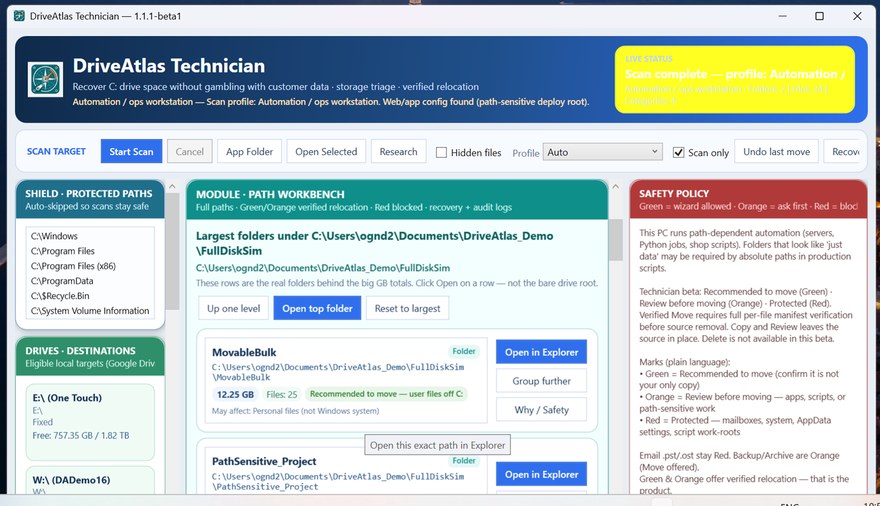
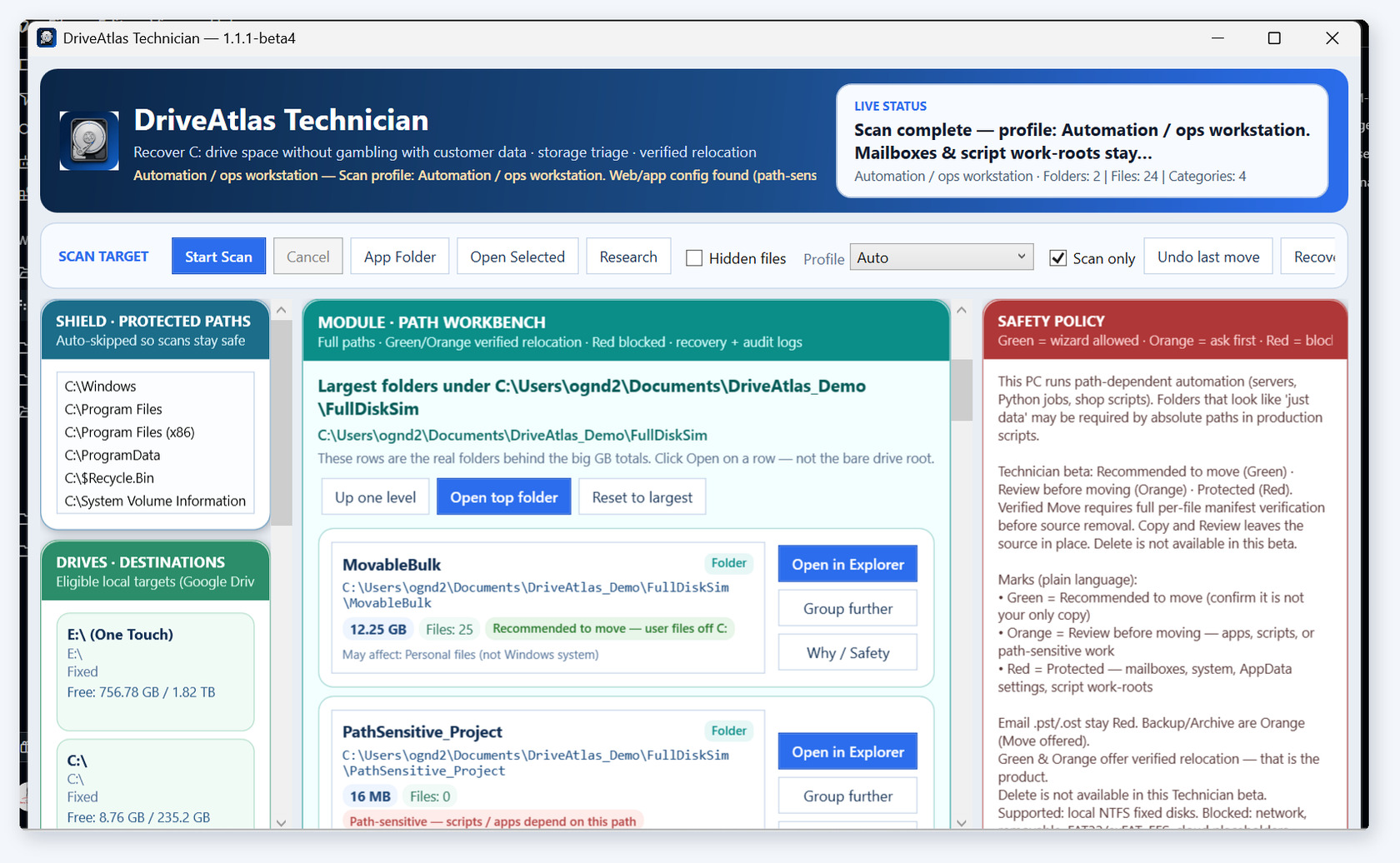
DriveAtlas Path Workbench — Move Candidate folders with size, file count, and safety classification

Path Workbench — meaningful storage, classified before any move

○Technician-supervised
□No Delete capability
◇Local processing
#Manifest-based verification
≡Operation history

Built for technicians who must make a defensible storage decision.

For Windows support professionals

DriveAtlas is designed for technicians handling full-system-drive incidents where finding large content is only the first step. The technician still has to understand what the content is, whether its path matters, and what action is appropriate.

Storage triage with controlled relocation

DriveAtlas maps meaningful storage, classifies findings, and provides three supervised modes: Scan Only, Copy and Review, and Verified Move. Every operation remains under technician control.

Boundaries are part of the product

DriveAtlas does not delete files, migrate installed applications, or relocate Outlook PST/OST stores. It blocks protected, cloud-managed, encrypted, virtualized, linked, network, and otherwise unsupported locations.

Three modes. One technician-controlled workflow.

  • Scan Only — Inspect meaningful storage without changing the source or destination. Identify candidates, review path sensitivity, and understand what DriveAtlas will block.
  • Copy and Review — Copy approved supported content to another local NTFS or exFAT volume while leaving the original source intact for inspection.
  • Verified Move — Build a per-file SHA-256 manifest, copy the supported content, and compare the destination against the complete manifest. Source removal proceeds only after a full match and technician approval.

How access works

DriveAtlas Technician is publicly discoverable through demonstration content and the upcoming Microsoft Store Scan Preview. The full-function Founding Beta remains application-reviewed; there is no anonymous public EXE download from this site.

The decision after the scan

Finding large files is easy. Deciding what to do with them is not.

A size-analysis tool can show that a directory occupies 40 GB. It cannot automatically determine whether that directory is disposable, customer-owned, path-sensitive, cloud-managed, application-dependent, or appropriate for relocation.

DriveAtlas focuses on that operational gap. It helps the technician separate reasonable move candidates from content that requires review and content that should not be touched by this workflow.

Storage tools show size

Useful—but size alone does not explain whether content can be moved.

Windows folders are not equal

Downloads, CAD libraries, source projects, mail stores and application data carry very different risks.

Customer work must be documented

DriveAtlas records the approved relocation workflow instead of leaving an undocumented drag-and-drop operation.

Controlled from start to finish

A documented workflow for recovering C: drive capacity

1

Identify meaningful storage

Scan supported local storage and surface the folders and files that materially contribute to the capacity incident.

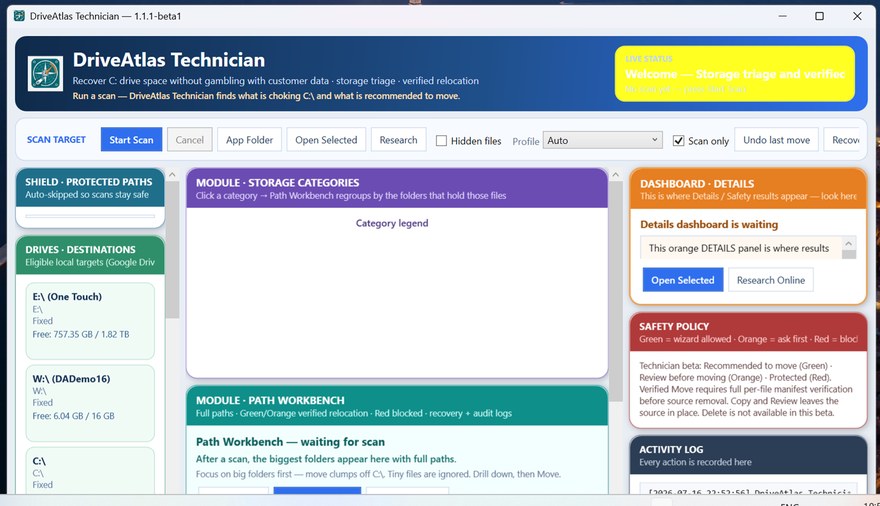
DriveAtlas scan / Path Workbench overview
2

Understand the path before acting

Review whether content is a Move Candidate, Path-sensitive, or Protected or Unsupported. DriveAtlas blocks operations outside the current product boundary.

DriveAtlas classification colors
3

Compare every supported file

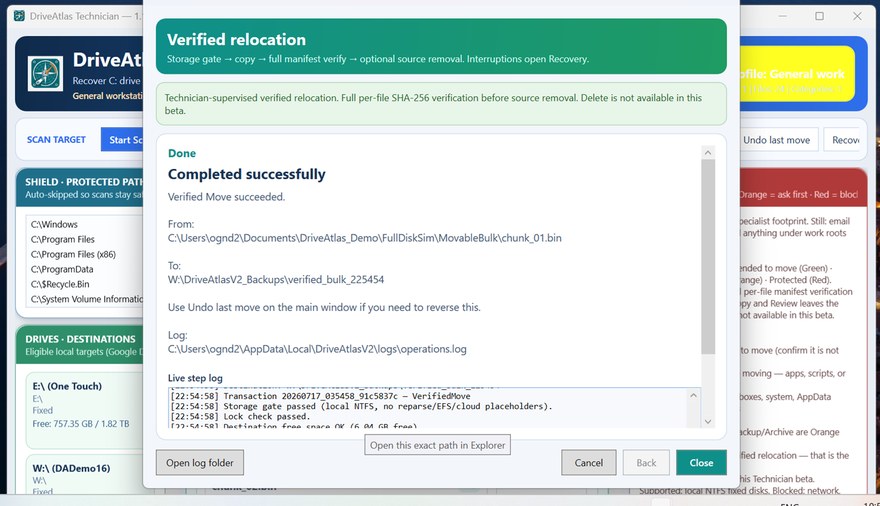
For Verified Move, DriveAtlas creates a per-file SHA-256 manifest, copies the content, and reconciles the destination against the complete source manifest.

DriveAtlas verified relocation workflow
4

Keep the technician in control

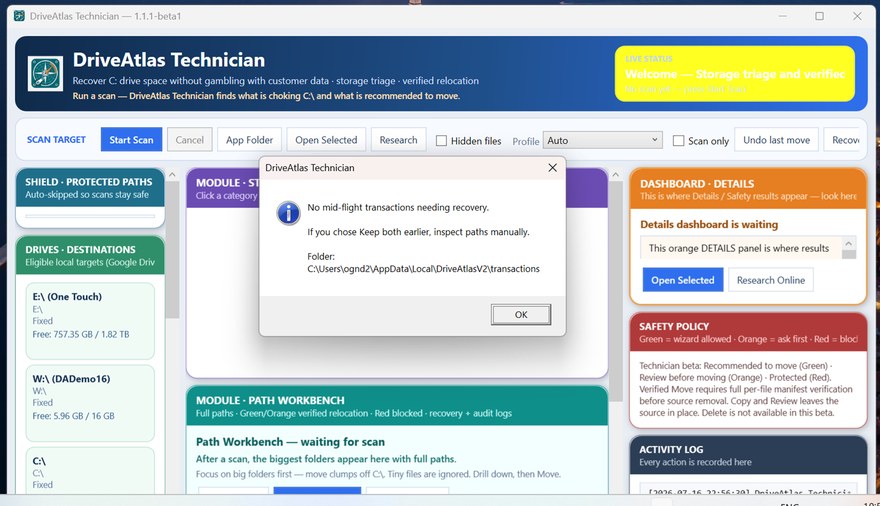
Source removal occurs only after verification and technician approval. History, Undo assistance, and interrupted-operation Recovery help document and manage the workflow.

DriveAtlas operation history and recovery

Undo assistance and Recovery are assistance mechanisms—not guarantees and not substitutes for a verified backup. How Verified Move works

Product demonstration

See how DriveAtlas handles a full-drive incident

The demonstration shows the decision process—not just the UI. Meaningful storage, blocked paths, and technician control are all on a dedicated Demo page.

Open the Demo page →

Viewing the demonstration does not download, install, or activate DriveAtlas Technician.

A different job

DriveAtlas is not another disk cleaner

Disk cleanup tools

  • Focus on caches, temporary data, and content considered disposable
  • Often present deletion as the expected outcome
  • Optimize for fast cleanup and convenience
  • May treat large size as evidence that content should be removed
  • Usually stop after identifying or deleting data

DriveAtlas Technician

  • Focuses on meaningful user and work-related storage
  • Uses supervised relocation rather than deletion as its core workflow
  • Identifies path-sensitive and unsupported content
  • Requires technician review and approval
  • Verifies supported copied files before source removal
  • Records the operation and supports later review

DriveAtlas complements storage-analysis and cleanup tools by addressing the technician decision and relocation workflow that follows discovery.

A deliberately limited beta

Clear support boundaries are part of the safety model

Supported in the current beta

  • Windows 10 and Windows 11
  • Local NTFS and exFAT volumes (fixed or removable destinations)
  • Supported, readable files and folders
  • Technician-supervised interactive use
  • Scan Only, Copy and Review, and Verified Move
  • Operation history, Undo assistance, interrupted-operation Recovery

Blocked or unsupported

  • Windows and Program Files locations
  • Protected Microsoft application-data locations
  • Network and mapped drives · Cloud-managed paths · EFS-encrypted and virtualized storage
  • OneDrive and other cloud-managed paths
  • EFS-encrypted content · Virtual-machine disk files
  • Outlook PST and OST stores
  • Junctions, symbolic links, and mount points
  • Installed-application migration · Delete operations

A blocked result is not a recommendation to move the content manually. It means the item requires a different tool, workflow, or level of investigation. These boundaries, including the deliberate PST/OST block, are fixed product facts. FAT32 destinations are allowed only when no file exceeds 4 GiB.

Supported environments · Unsupported environments

Private U.S. beta

DriveAtlas Technician — Founding Technician Beta

The current beta is intended for Windows technicians who regularly handle full C: drives and are prepared to test the product within its documented support boundaries.

Applications are reviewed individually. Accepted technicians receive a private build and direct contact through MCAM Studios. There is no public executable storefront.

Accepted technicians receive the full-function DriveAtlas Technician private beta for the currently supported feature set.

It is not a feature-limited demo, scan-only edition, or automatic trial download. The documented beta limitations and supported/unsupported environment boundaries still apply.

The current beta may display a Windows SmartScreen warning. Participants must follow their own organizational security policies and should not disable endpoint protection to run the software.
$99 USD per named technician
  • Full-function private beta for the currently supported feature set
  • Named-technician use
  • Private build delivery after acceptance and payment confirmation
  • Product documentation
  • Direct support through support@mcamstudios.com
  • Participation in the Founding Technician feedback process
Apply for the Founding Beta

Review Supported Environments · Contact MCAM Studios

Applying does not guarantee acceptance. No executable is delivered through the public website.

The studio behind the product

MCAM Studios

Practical software built from real technical work.

support@mcamstudios.com

About MCAM Studios · Field and Observatory Solutions

Field-hardened software from real technical operations

MCAM STUDIOS S.A.S. is the legal entity behind DriveAtlas. José David Contreras is the founder and lead in Colombia. The studio grew from building the tools required to keep actual technical operations moving: Windows support utilities, shop-floor workflow systems, deployment scripts, WordPress plugins, hardware-control applications, and internal automation.

That work includes software built and operated for a private observatory in the northern latitudes of Colombia. The observatory stack includes session booking, controlled remote telescope access, ASCOM dome and shutter integration, monitoring plugins, hardware-control interfaces, relay and lighting control, weather and environmental sensing, and all-sky camera software.

DriveAtlas Technician is the MCAM Studios product for supervised Windows storage relocation. WorkAtlas is a separate product for Classic Outlook work recovery. Both keep the same operational discipline: explicit boundaries, technician approval, verification before commitment, recoverable records, and honest documentation of what each product does not handle.
Also from MCAM Studios

MCAM WorkAtlas 2.0

DriveAtlas deliberately blocks Outlook PST and OST stores because mailbox data requires a specialized workflow. WorkAtlas is that separate product: a local-first Commercial Preview that recovers actionable work from Classic Outlook PST mail on the workstation.

Commercial Preview · $149 one-time Paid Pilot · one named operator · Classic Outlook x64 · No public EXE download

DriveAtlas and MCAM Studios — Frequently Asked Questions

Is DriveAtlas a disk cleaner?

No. DriveAtlas does not search for “junk,” offer a Delete mode, or decide automatically that large content should be removed. It is a supervised storage-triage and relocation tool for Windows technicians working with supported local NTFS and exFAT volumes.

What is Verified Move?

Verified Move creates a per-file SHA-256 manifest of the supported source content, copies the files to the selected destination, and compares the destination against the complete manifest. Source removal is permitted only after a full match and technician approval.

Why are Outlook PST and OST files blocked?

PST and OST stores are not ordinary document folders. They may involve Outlook profiles, indexing, application state, synchronization, mailbox configuration, and recovery concerns. DriveAtlas blocks them deliberately because they require a specialized workflow.

Is there a public DriveAtlas download?

No. MCAM Studios does not provide a public EXE storefront for the current beta. Accepted technicians receive the full-function private beta for the currently supported feature set, delivered privately after acceptance and payment confirmation.

What is MCAM Studios’ observatory involvement?

MCAM Studios builds and operates software for a private observatory in the northern latitudes of Colombia—including booking and session coordination, authorized remote telescope access, ASCOM dome and shutter integration, monitoring plugins, hardware-control interfaces, weather and environmental sensing, relay control, and all-sky camera software.

What is WorkAtlas?

WorkAtlas is a separate MCAM Studios product. DriveAtlas still blocks PST/OST relocation. WorkAtlas is a Commercial Preview for recovering work from Classic Outlook PST/OST mail ($149 USD one-time Paid Pilot, one named operator). It is not a public EXE download. WorkAtlas product page.

View the full FAQ · Release Integrity · Pricing

Do full C: drives regularly become your responsibility?

Apply to evaluate a supervised storage-triage and verified-relocation workflow built specifically for Windows technicians.

Private reviewed beta · $99 USD per named technician · No public EXE download

Current download: MCAM.DriveAtlas-Setup-1.1.1-beta6.exe
SHA-256 4BD0C3F527CCE919BBE94A16D89E8F1C612C84D237AD94E9E152A7DA47B5052A

Installed application: DriveAtlasTechnician.exe
SHA-256 6A88CFB9A0F9E18B26CDCF4205B6B90141898BC11E66B433E8AEC8E399B61606

These are different files. Hash the file you actually have. See Release Integrity.